Date: Tue, 4 Aug 2026 19:29:46 +0000
To: CODE4LIB_at_LISTS.CLIR.ORG
My friend says to your friend:


  *
Text and document file formats are different. Trying to read a document in a text file app usually fails.
  *
Different versions of Microsoft Word docs have different file formats.
  *
What's the actual name of the disappointing reader app?
  *
Microsoft Word Android app ought to work on the Moto if it's a recent Droid. Try the latest Word for Droid on the Moto.
  *
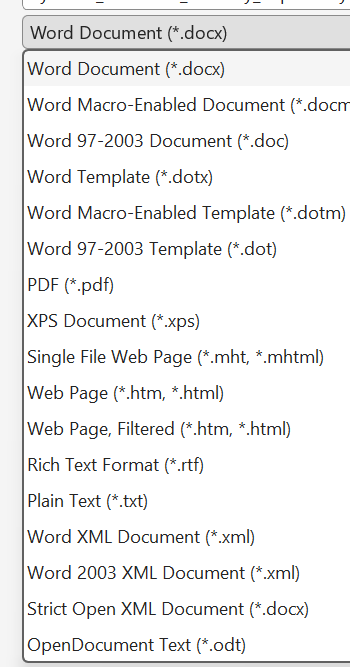
From Windows Word, try export/save-as of the doc in various different formats to see which format the suspect Droid document app can handle: docx, doc, odt, xps, rtf, pdf, txt, etc.

[cid:8848c33f-22c3-4ce8-87bf-7457f26308e8]

________________________________
From: Code for Libraries <CODE4LIB_at_LISTS.CLIR.ORG> on behalf of charles meyer <reachmeplace_at_GMAIL.COM>
Sent: Tuesday, August 4, 2026 1:54 PM
To: CODE4LIB_at_LISTS.CLIR.ORG <CODE4LIB_at_LISTS.CLIR.ORG>
Subject: [EXTERNAL EMAIL] [CODE4LIB] Text Editor - Motorola cell phone

My esteemed listmates,

A friend has a Motorola Android cell and when she downloaded Word to that
cell phone and a highly touted doc reader neither could open a Word file
she transferred to her cell phone from a laptop running W11.

Have you found a "go-to" text editor which works well on a Motorola?

Word works on my Samsung.

Thank you kindly!

Charles.

Charlotte County Public LIbrary